The name iMind may sound like some new AI research project from that well-known Cupertino company, but as you read some iMind reviews, you’ll realize that’s not the case. Behind their unmemorable name, there’s a straightforward video conferencing service designed for simplicity.
If you need a simple and affordable service to conduct and record your conferences, iMind is a good option.
The Leanest and Meanest Video Conferencing Platform
The video conferencing market is overcrowded with leaders like Zoom, Slack, Google Meet, Microsoft Teams, WebEx, GoToMeeting, Bluejeans, and many more.
With so many top-tier companies, why would you need another option? Because the market lacks a simple, secure, and minimalistic video conferencing application from India, and that’s where iMind can deliver.
iMind doesn’t require sophisticated setup procedures. You can register with a work or personal email address to manage your account. Or, you can sign in with your Microsoft, Google, or Apple account.
Next, choose a subdomain for your company or personal meeting space. For example, if your company is named Osaka Seafood Concern, you would create the custom URL “osakaseafoodconcern.imind.com.” You’ll use this vanity URL to share with your coworkers and friends.

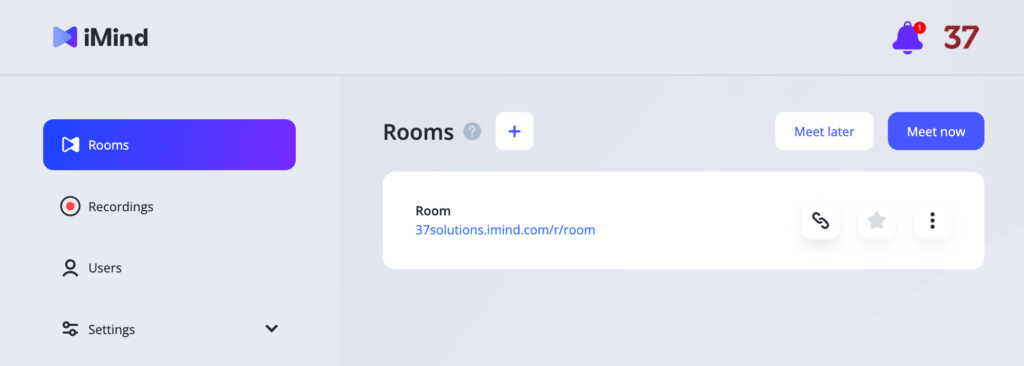
After registration, you’ll see your dashboard, where a default room was created for you even if you opt for the free tier, which supports up to ten rooms.
To invite someone, copy the link and email it to your guests. After clicking the meeting link, they can join the meeting without registering. Or, they can create an email-based account or use a third-party provider like Microsoft, Google, and Apple.
Once in the meeting, you can communicate via video and computer audio, or camera-shy guests can choose the audio-only option. In the preview window, you can control your camera and microphone, share your screen, or watch someone else’s presentation. And if you’re the meeting administrator, you can mute or switch to the audio-only mode for the entire conference.
There’s a chat where you can send messages to all the participants or mention (via the @) any particular guest.
As for security, iMind offers a model where you don’t need a password to re-authorize; instead, you’ll receive a single-use code each time you have to. Audio, video, and chats are encrypted with AES-256. So even in public places with sketchy Wi-Fi, your communication is secure. By default, you also have the noise canceling feature, which does its job well enough for a free service.
Pricing and Extra Features
With the free subscription, you get one room that can host up to 100 attendees for conferences up to 40 hours long. You can also connect third-party WebDAV services for scheduling, and there’s even cloud storage for storing the recordings of your meetings. All for free!
But, for power users, there are paid tiers that add even more features:
- Pro ($7/mo per license). Allows unlimited rooms, room URLs, and custom branding.
- Business ($10/mo per license). It also has unlimited cloud storage for recordings, a custom subdomain, and WebDAV integration.
- Enterprise. It comes with extra support, but the terms (including the price) are discussed individually with your account manager.
The maximum number of licenses on the Pro plan is limited to 99, while the Business plan allows 999. Larger companies need to contact their account manager and use the Enterprise version.
What to Pay Attention to When Using iMind
There are some nuances you need to keep in mind. Here are some hints for you to fully enjoy the benefits of the platform:
- No mobile apps — It still works in the web version on phones and tablets, though. Save your password in your browser for quick access.
- Use modern updated browsers — Not all mobile browsers are created equal. On iOS (iPhone and iPad), it performs best with the latest version of Safari. We recommend using it on iOS devices with your Apple account or email-based address instead of Google or Microsoft.
- No video filters — Being a simple and free application, it lacks enhanced features like background filters or blur effects.
The company is prominent in post-Soviet countries, mainly Central Asia, and is also used in Europe.
The Main Benefits
Some situations make iMind a good workaround if you don’t want to use other popular services:
- Your security policy imposes limitations on installed apps on your device. Well, without an app, you can go with nothing but the browser.
- You don’t want to spend time instructing potential participants how to install and set up the conferencing app. Here it’s all simpler.
- You’re good with up to 100 participants, but you want your conferences to last up to 40 hours.
- You need something functioning for free, and you’re good with ads.
In these situations, iMind is quite a decent solution. At least, giving it a try is simple and comes without any obligations, so ask yourself: would I mind?