
UPDATE: Divi fixed this issue in version 4.27 on July 17, 2024. WordPress fix the problem in version 6.6.1 a few days later. If you are still having trouble, please try the steps below or reach out to support.
The WordPress 6.6.0 underline bug has caused quite a stir in the WordPress community. It’s one of those pesky little issues that can really trip you up, especially if you’re not a WordPress administrator or developer.
The issue is that unwanted/unexpected underlines appear on website links after updating to WordPress 6.6.0 (released July 16, 2024). This has people wondering if they accidentally hit some weird formatting button. However, it primarily affects users of the popular Divi theme (or the standalone Divi builder) from ElegantThemes.
Need Help Fixing This Issue Today?
37SOLUTIONS Digital Marketing and Managed IT Services can help you fix this today! Reach out to our support team here: https://support.37solutions.com/hc/en-us/requests/new
What is the WordPress 6.6.0 Underline Bug?
So, what exactly is this WordPress 6.6.0 underline bug? Basically, after updating to WordPress 6.6.0, you might have noticed that all (or most) of the links on your site, those clickable bits of text that take you to other pages or websites, suddenly have underlines.
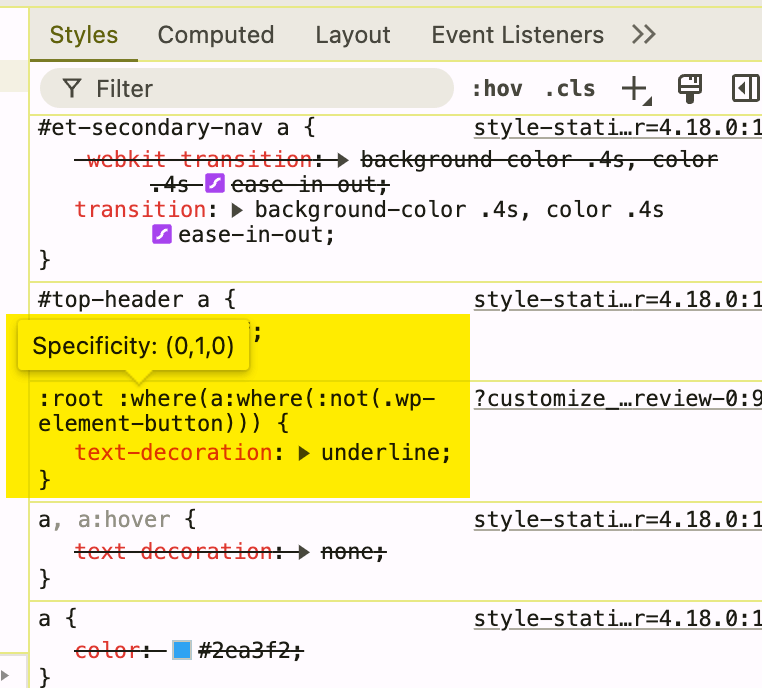
Here’s the bit of code that’s causing the problem:
:root :where(a:where(:not(.wp-element-button))) {
    text-decoration: underline;
}
This can be a bit jarring for users who are used to a specific link styling on your website, and it might even clash with your overall site design. You spend hours crafting the perfect blog post, ensuring that every link blends seamlessly with your aesthetic. Then, BAM! WordPress 6.6.0 comes along, decides underlines are back in fashion (I’m being facetious), and throws your whole design out of whack. Frustrating, right?
Here’s the technical lowdown: A tiny snippet of code in the WordPress 6.6.0 update is the culprit. It basically tells all links to display an underline by default. You might think, “No big deal; I’ll just change it back in my theme settings.” However, this new default behavior can be a real pain to override, even if you try to adjust your link styles in the WordPress Customizer or through CSS.
Why Is Everyone Making Such a Fuss About a Few Underlines?
This underline debacle is about more than just aesthetics. While some might not mind a little extra emphasis on their links, for many, this WordPress 6.6.0 underline bug messes with branding, accessibility, and user experience.
Consistency is vital in web design. If your links usually don’t have underlines, this sudden change can confuse visitors, making them question whether those underlined words are actually links. It can make your site look less polished, as if you still need to finish putting everything in its place. On the accessibility front, the WordPress 6.6.0 underline bug can create problems for people who rely on specific visual cues to navigate websites.
Website hosting providers like 37SOLUTIONS, which offer fully managed WordPress hosting solutions, would need to fix potentially hundreds of Divi websites. Website designers and developers have used Divi on over 2.2 million websites, so I’m sure they’re getting some phone calls from panicked business owners.
Real-World Examples of the WordPress 6.6.0 Underline Bug
Let’s say you’re running an online store with a minimalist black-and-white theme. Suddenly, blue underlined links start popping up everywhere, screaming for attention and clashing with your stylish design. It’s like wearing a tuxedo with mismatched socks.
These rogue underlines can be a real headache for a news website that relies on subtle link styling to maintain a clean and professional look. Imagine trying to read an article where every link is vying for your attention!
Tackling the WordPress 6.6.0 Underline Bug: What Can You Do?
There’s no need to panic, but you shouldn’t wait for a patch either. The WordPress team typically releases x.x.1 patches in 33.4 days.
So, while we wait for a permanent fix from the WordPress team in version 6.6.1, some clever workarounds can banish those rogue underlines for the time being.
Downgrade to WordPress 6.5.5
This is the fastest, easiest, and least risky option for most WordPress website owners. Our parent company, 37SOLUTIONS, has created a knowledgebase article to fix the WordPress underline bug.
Install a Temporary Plugin
The WordPress developers are working on an update to the Gutenberg plugin, which will address this issue until the full WordPress patch is finalized.
For WordPress owners running an e-commerce site using WooCommerce or similar tools, this temporary plugin option might be the best bet to reduce lost sales/revenue from restoring last night’s backup.
We will provide an update here when we have more details.
Restore Your Website From A Backup
The WordPress 6.6.0 release went live today (July 17, 2024), so you can restore your website from last night’s backup to fix the problem (unless you’re running a WooCommerce store, received a significant number of leads, or made substantial changes since your last backup).
After the restore finishes, you’ll have to adjust your wp-config file to prevent the website from automatically updating to WordPress 6.6.0; otherwise, you’ll have to do this again tomorrow.
Most qualified website hosting providers include nightly backups for free (except GoDaddy—they suck). Contact support or sign in to your control panel to review your options.
Support Provided A Temporary CSS Patch
The Divi support team said that you can temporarily fix the problem by using the following CSS on your website until the WordPress developers release a patch.
:root :where(a:where(:not(.wp-element-button))) {
text-decoration: none;
}
Managing WordPress Updates
WordPress updates are essential for security and performance, but as we’ve seen with this underline situation, they can sometimes introduce unexpected issues. Remember, even the most well-coded themes and plugins can occasionally have compatibility issues with new WordPress versions (does anyone remember the WordPress 5.5 disaster where they changed the JavaScript version?)
This underlines (pun intended) the importance of staying informed about WordPress updates and any potential bugs they might bring. Follow WordPress blogs, forums, and social media channels to keep up with the latest news, bug reports, and fixes. Engage in these communities and ask questions or share your experiences. Contact a WordPress developer for assistance if you are uncomfortable tinkering with code.
FAQs about the WordPress 6.6.0 underline bug
How to get rid of underline onlinks in WordPress?
You can get rid of the underlines using CSS, but you’ll need to remember to revert your change if version 6.6.1 fixes the issue. You will want to add the following to your theme’s style.css file according to WordPress support:
:root :where(a:where(:not(.wp-element-button))) {
text-decoration: none;
}
How do I get rid of the red underline in WordPress?
Red underlines usually appear when a word is misspelled and is not part of this particular bug. You will want to correct the spelling and save your changes.
How to underline text in WordPress?
While editing a post or page, simply highlight the text you want underlined and click the underline button in the block editor toolbar. If you are working in the code editor, you can wrap your content in “u “tags. For instance, this is underlined text.
How do I underline a page title in WordPress?
It is not recommended that you underline page titles; however, the process for underlining them is exactly the same as for underlining any other text in WordPress. If you’d like your titles to stand out, I recommend trying bold or a different font size. Just make sure it fits in with the overall design of your website.
Final Thoughts
While the WordPress 6.6.0 underline bug is a minor annoyance for some, it has highlighted the need for thorough testing and communication in the WordPress ecosystem. The good news is that the WordPress community is incredibly proactive in addressing these issues. We can expect a permanent solution within the next 30-60 days.
For now, those handy workarounds will do the job. Remember, the key is to stay informed, explore solutions, and reach out to your fellow WordPress users for support if needed. Together, we can banish those rogue underlines and get back to enjoying all the wonderful things WordPress has to offer.
For more up-to-the-minute solutions, please check out the 37SOLUTIONS knowledgebase here: https://support.37solutions.com/hc/en-us/articles/28560628648084-WordPress-Upgrade-To-6-6-0-Adds-Unwanted-Underlines-To-All-Anchors
Sources:
- https://wordpress.org/support/topic/all-hyperlinks-now-underlined/
- https://wordpress.org/support/topic/6-6-update-caused-underline-on-all-links/
- https://github.com/WordPress/gutenberg/issues/44166
- https://core.trac.wordpress.org/ticket/61660
- https://make.wordpress.org/core/2024/06/21/wordpress-6-6-css-specificity/